01↗
MUSIC DISCOVERY
The interface needed to make different music collections easy to discover without overwhelming the listening experience.
A browser-based music player designed around music discovery, dynamic MP3 libraries and simple, accessible playback controls.
UI/UX × Development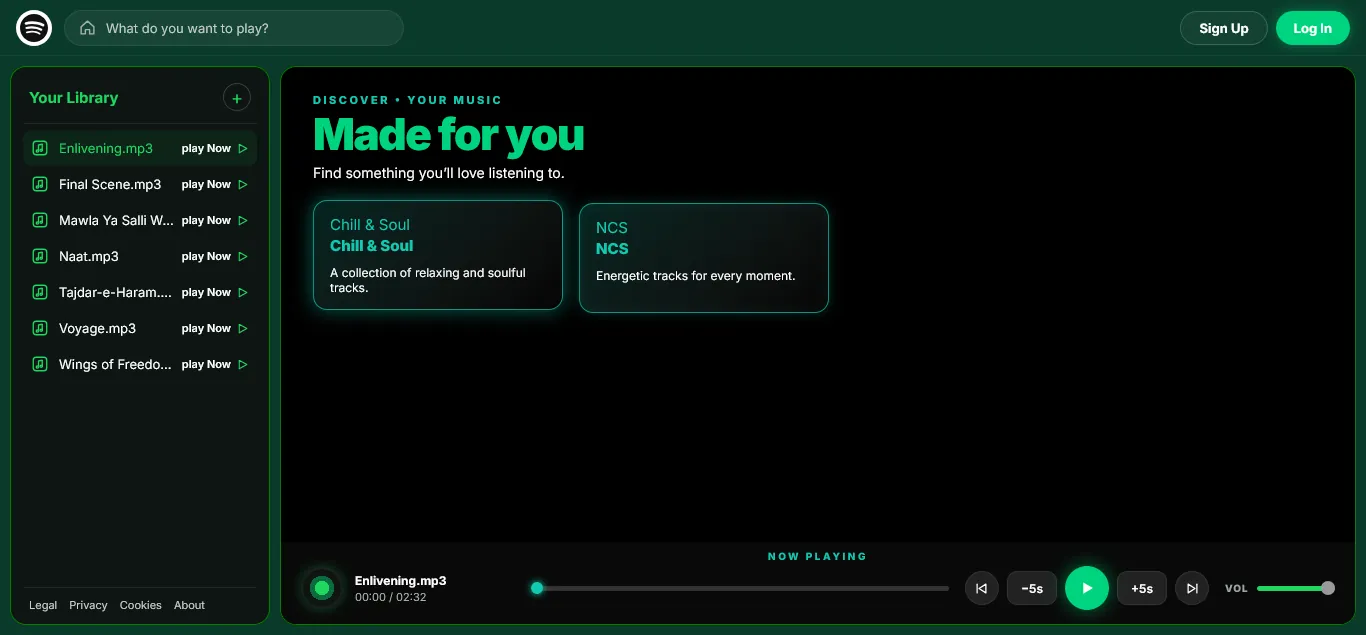
Spotify Clone is a browser-based music player built from scratch around a familiar streaming experience.
The application brings together a music library, discovery categories and persistent playback controls in one interface.
The goal was to keep the experience simple while still making the player feel like a complete music application.
Visit the live project↗The goal was not just to recreate the appearance of a music platform. The challenge was creating a complete listening flow around the music that was actually available.
The interface needed to make different music collections easy to discover without overwhelming the listening experience.
The library needed to display available MP3 files dynamically instead of depending on a fixed set of tracks.
Core controls such as play, pause, previous, next, seeking, volume and five-second skipping needed to work together naturally.
The interface had to feel familiar and functional while keeping the number of visual elements under control.
Built a Spotify-inspired dark interface.
Created a dedicated music library sidebar.
Added music discovery categories.
Connected available MP3 files to the library.
Implemented play, pause, previous and next controls.
Added seek, volume and ±5 second controls.
The actual application is organised into three main areas: the library, the discovery section and the persistent player.
The left sidebar keeps available tracks visible and gives users a quick way to start playing a song.
The main area highlights music categories such as Chill & Soul and NCS to make the application feel more like a real streaming platform.
The bottom player remains visible with track information, progress, playback controls and volume.
Instead of designing the case study around imaginary songs or screenshots, the project is presented around the actual MP3 library visible inside the application.
Find something you'll love listening to.
A collection of relaxing and soulful tracks.
Energetic tracks for every moment.
Enlivening.mp3
00:00 / 02:32
The bottom player provides the controls users need while keeping the main discovery area uncluttered.
Start and stop the current track.
Move through a track using the progress bar.
Adjust playback volume directly from the player.
Quickly move backwards or forwards during playback.
Navigate between tracks without leaving the player.
Structured the application around the library, discovery area and persistent playback controls.
Created a dark interface with green accents, rounded surfaces and strong visual hierarchy.
Built the interface and audio interactions using frontend technologies and browser audio functionality.
Adjusted spacing, controls, typography and responsive behaviour to make the player easier to use.
This project was both a UI/UX and frontend development exercise. The interface and the interaction system were developed together.
The player handles track selection, playback, previous and next navigation, seeking, volume and quick five-second controls.
The result is a lightweight browser music application that connects a custom interface with real audio behaviour.
Design + Code + Interaction
The final result is a live browser-based music player with a custom interface, dynamic library, music discovery and functional playback controls.
Available as a working browser application
Functional browser audio playback
Designed around different screen sizes
A music interface is not only about making the UI look familiar. Discovery, selection and playback need to feel like one connected system.
Working with dynamic music content showed me how interface components need to respond to changing data instead of relying completely on static layouts.
Building the player helped me connect visual design decisions with real JavaScript behaviour and browser audio functionality.
Open the actual music player and explore the library, discovery categories and playback controls.
Open Spotify Clone↗